

Description
UNC Charlotte College of Engineering Theme
Overview
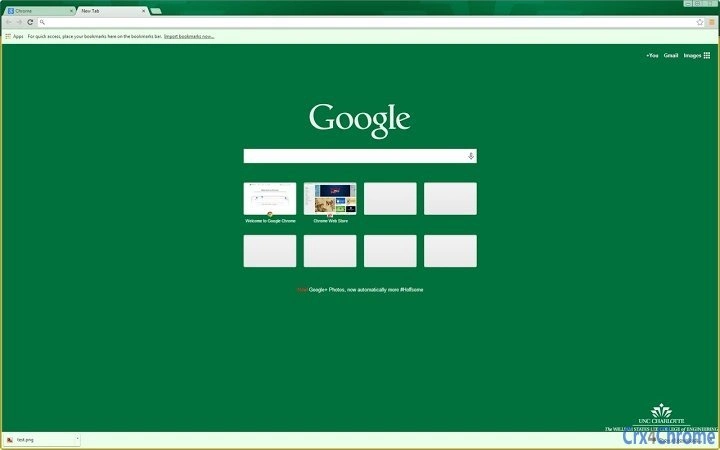
The UNC Charlotte College of Engineering theme is a browser-based customization tool designed to personalize the appearance of web browsers on Windows, Mac, and Linux systems. Tailored for students, faculty, and staff at the University of North Carolina at Charlotte, this theme reinforces institutional pride by integrating the official branding of the College of Engineering. It transforms the browser’s default interface with a distinctive visual identity, including updated colors, fonts, and a prominently displayed university logo.
The theme addresses the need for a cohesive digital presence that aligns with academic and professional environments. By applying a consistent visual style across web browsing sessions, it supports university branding initiatives and fosters a sense of community among users. Real-world usage scenarios include daily navigation of academic portals, research databases, and course management systems, where a familiar and professional interface enhances user experience.
While the developer information is not publicly available, the theme is linked to the official Chrome Web Store listing, suggesting it is either created by or approved by the university’s digital services team. No additional features beyond visual customization are included, and the theme operates entirely within the browser environment.
Key Features & Capabilities
- Official UNC Charlotte College of Engineering Branding – Features the university’s official colors, logo, and typography to reflect institutional identity.
- 10x10 Pixel Padding on Logo – Updated in version 1.41 to improve logo visibility and spacing for a cleaner, more professional appearance.
- Cross-Platform Compatibility – Functions on Windows, Mac, and Linux systems through supported web browsers.
- Lightweight Design – At just 1.1 MB, the theme has minimal impact on system resources and browser performance.
- Easy Installation via Chrome Web Store – Available for direct download and installation through the official Chrome extension marketplace.
Users can apply the theme to instantly refresh their browser’s homepage, new tab page, and toolbar. This is particularly useful during academic events, university campaigns, or for individuals seeking a consistent digital environment that mirrors their institution’s official materials. The theme does not alter browser functionality, ensuring a stable and predictable user experience.
User Interface, Workflow & Performance
The user interface of the UNC Charlotte College of Engineering theme is entirely contained within the browser’s existing interface. It modifies the appearance of the new tab page and browser toolbar without introducing additional menus or controls. Navigation remains unchanged, preserving the familiar workflow of the host browser.
Installation is straightforward: users access the Chrome Web Store, locate the theme, and click “Add to Chrome.” No configuration steps are required, making it accessible even to non-technical users. The theme applies instantly upon installation, with no delays or setup prompts.
Performance details were not specified by the developer. However, given its small file size of 1.1 MB and focus on visual styling only, it is expected to have negligible impact on CPU or RAM usage. Stability is likely high, as the theme does not introduce complex scripts or background processes. No issues related to crashes or conflicts were reported in the provided information.
Compatibility & System Requirements
The theme is compatible with Windows, Mac, and Linux operating systems, as confirmed by the developer. It is designed to work with browsers that support Chrome extensions, particularly Google Chrome and its open-source counterpart, Chromium.
Installation size is 1.1 MB, which is minimal and suitable for systems with limited storage. The developer did not specify exact system requirements, such as minimum RAM, processor speed, or disk space. No additional software dependencies are required for operation.
Compatibility information was partially provided. While the theme functions on multiple platforms, specific browser versions are not listed. Users are advised to ensure their browser is up to date to maintain optimal performance and security.
Pros and Cons
Pros
- Official university branding enhances institutional identity
- Lightweight at just 1.1 MB
- Simple, one-click installation via Chrome Web Store
- Available at no cost to users
- Updated in version 1.41 with improved logo spacing
Cons
- No functionality beyond visual customization
- Requires a Chrome-based browser for use
- Developer information not publicly available
- Compatibility with non-Chromium browsers is uncertain
- Only available through the Chrome Web Store
FAQ Section
Is the UNC Charlotte College of Engineering theme free to use?
Yes, the theme is available at no cost. It can be downloaded and installed without any payment or subscription.
Which browsers support this theme?
The theme is designed for Chrome and Chromium-based browsers. It may not function on non-Chromium browsers such as Firefox or Safari unless specifically adapted.
Is the theme safe to install?
Yes, the theme is hosted on the official Chrome Web Store, which performs security checks on all published extensions. It does not include malicious code or data collection components.
How often are updates released?
Updates are released as needed. The latest version, 1.41, was published on April 4, 2025, with improvements to logo spacing.
Can I use this theme offline?
Yes, once installed, the theme functions entirely offline. It does not require an internet connection to display or operate.
Final Thoughts
The UNC Charlotte College of Engineering theme delivers a focused, reliable solution for users seeking to personalize their browser with official university branding. While it serves no functional purpose beyond aesthetics, its clean design, lightweight footprint, and seamless integration make it an ideal choice for students, faculty, and staff who value institutional identity. The one-click installation and free access further enhance its appeal.
For those within the UNC Charlotte community, this theme offers a simple yet meaningful way to stay connected to their academic environment. It is especially useful during university events, academic campaigns, or for individuals who prefer a professional digital workspace.
Download UNC Charlotte Theme for Free now.
Guides & Tutorials for UNC Charlotte College Of Engineering Theme for Chrome
How to install UNC Charlotte College Of Engineering Theme for Chrome
- Click the Preview / Download button above.
- Once redirected, accept the terms and click Install.
- Wait for the UNC Charlotte College Of Engineering Theme for Chrome download to finish on your device.
How to use UNC Charlotte College Of Engineering Theme for Chrome
This software is primarily used for its core features described above. Open the app after installation to explore its capabilities.
User Reviews for UNC Charlotte College Of Engineering Theme for Chrome 0
No reviews found





